

 Rafraîchir
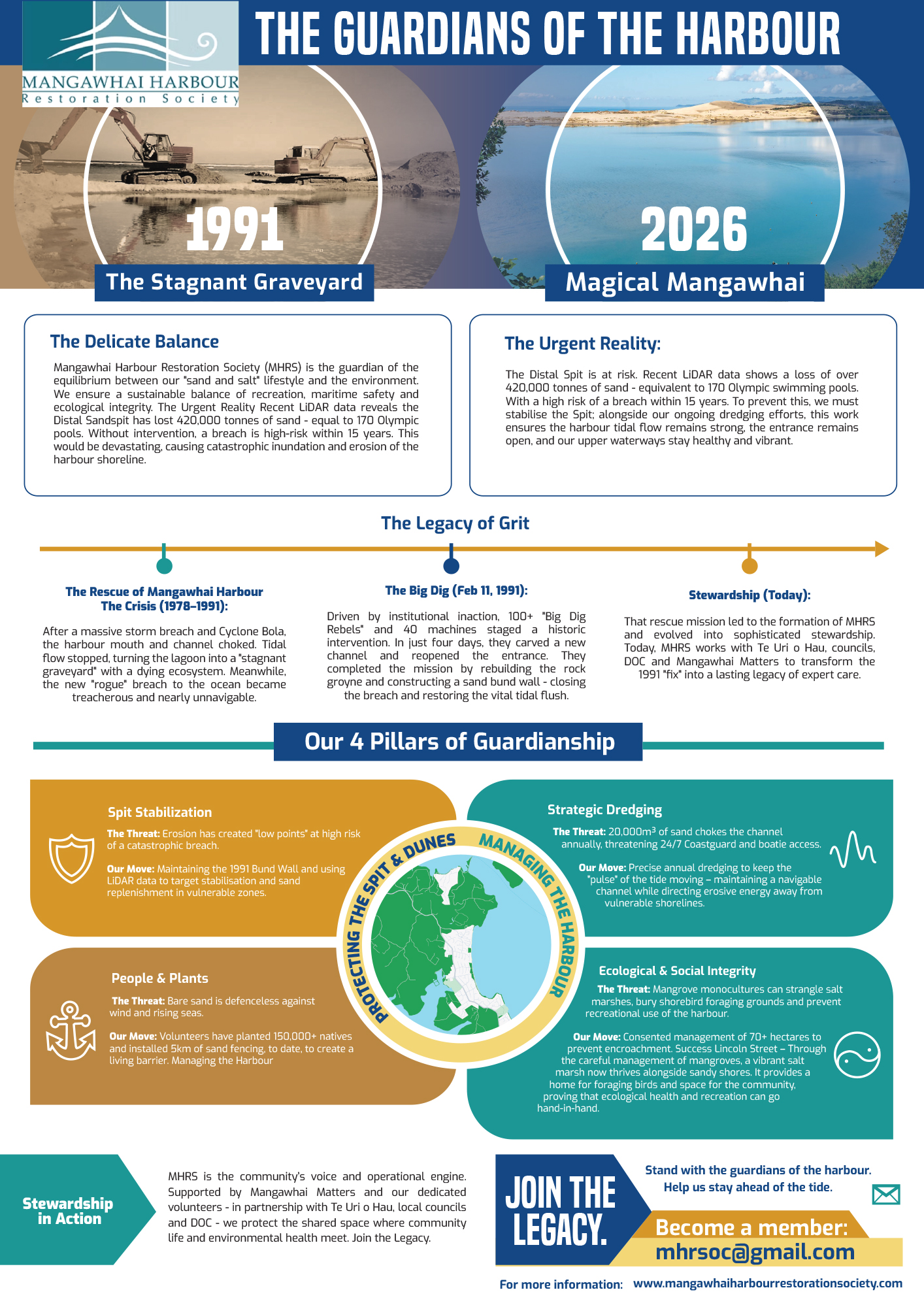
Harbour Society Infographic
Vous souhaitez remporter un projet comme celui-ci ?
Ce client a reçu 10 designs infographie de la part de 3 designers. Il a choisi ce design infographie de MNM comme design gagnant.
Inscrivez-vous Trouvez des Projets de Design
-
 NZ$190
-
 10 designs
-
 3 designers
Brief de Design Infographie
Mangawhai Harbour Restoration Society is a non-profit organisation based in New Zealand. We are the primary guardians of the Mangawhai Harbour. (A4 Layout, preference single sided, but can be double sided or A3 if that works better.
Project Overview:
We need a high-impact, professional infographic designed to share with government stakeholders, media and community. The design tells the story of a community-led harbour rescue in 1991 and its evolution into modern environmental stewardship today.
Style & Aesthetic:
• Tone: Authoritative, professional and community-focused.
• Layout: Clean, high-contrast and easy to scan. It features a "Past vs. Future" visual hook and groups 4 strategic "Pillars" into Land and Water categories.
• Color Palette: Navy Blue (Maritime), Sandy Gold (The Spit), and Teal/Turquoise (Clean Water).
Deliverables:
• Print-ready PDF (CMYK, 300 DPI).
• Fully editable source file (Canva).
Key Requirements:
1. Strict Text Adherence: The provided copy is in New Zealand English. Please use the copy word-for-word. Do not change "Stabilisation" to "Stabilization" or "Defenceless" to "Defenseless."
2. Visual Hierarchy: Please visually group 4 distinct sections (Pillars) into two categories (Land vs. Water) using professional line-art icons.
3. Assets: I will provide the main header imagery (Past/Future portals). You will provide icons for the 4 Pillars (Shield, Pulse, Anchor, Balance).
4. Technical Symbols: Ensure cubic metres is rendered as m³ (superscript).
5. Copy: Please Do not edit, shorten, or rephrase any part of the provided text.
6. Visual Grouping (Section 3)
7. Zone A (Land/Spit): Group Pillar 1 and Pillar 3 together
8. Zone B (Water/Flow): Group Pillar 2 & 4 together
9. Visual Hook
10. Place the two circular "portals" (1991 vs 2026) at the top of the page side-by-side to create a "Before and After" impact.

