

 Rafraîchir
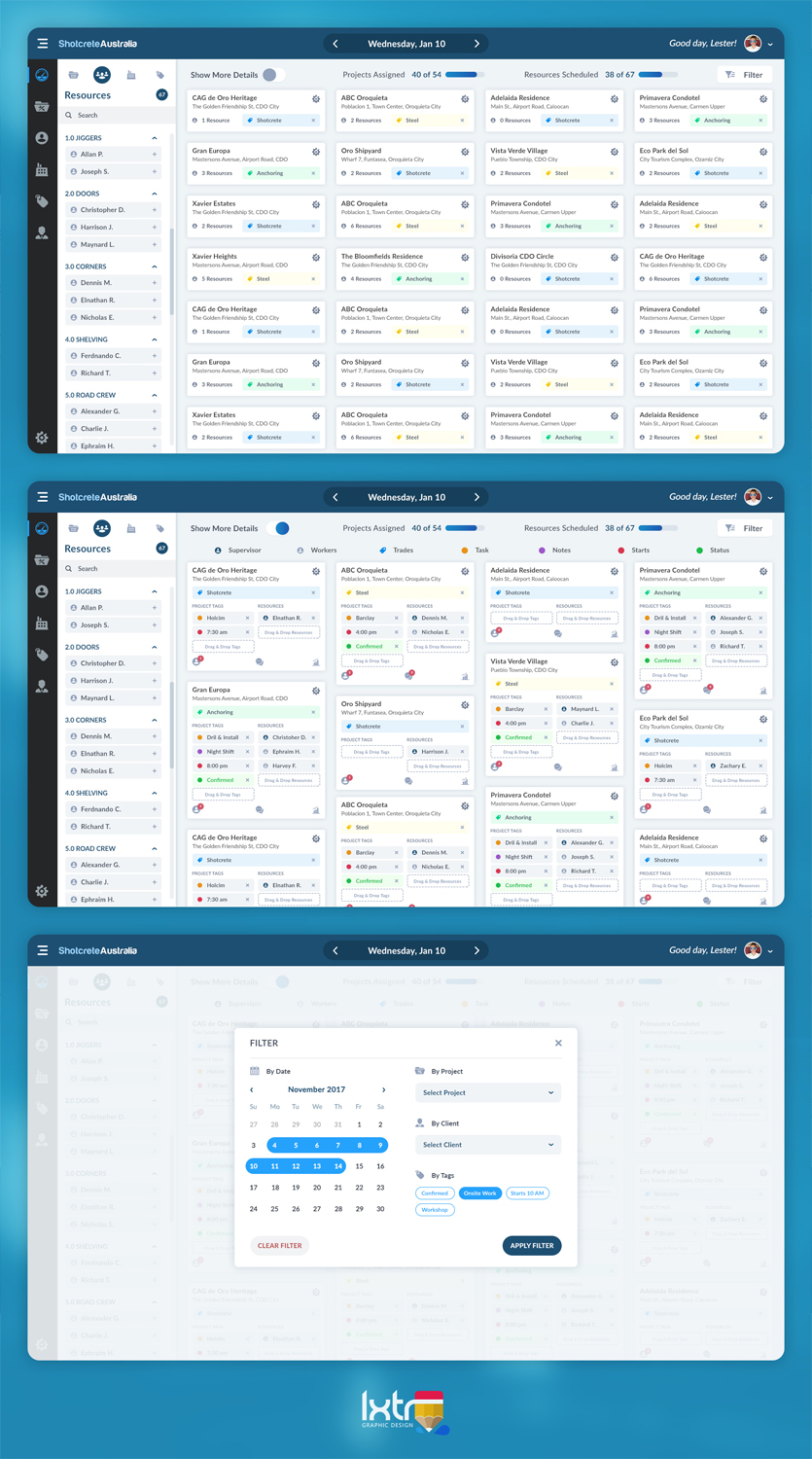
UI Mockup For Online Scheduling Software
Vous souhaitez remporter un projet comme celui-ci ?
Ce client a reçu 72 web designs de la part de 11 designers. Il a choisi ce web design de iLexter comme design gagnant.
Inscrivez-vous Trouvez des Projets de Design
- Garanti
-
 A$230
A$230
-
 72 designs
-
 11 designers
Brief de Web Design
11.01.2018 - Brief Update:
The brief has not changed but the summary below as being added to aid designers.
- New file added "Updated 11.01.2018 - Individual Box" to clarify the sections. Specifically the primary tag section
- Improve on the current styling
- Consider changing the section layout to maximise the number of blocks displayed on screen (The sections dont not need to be stacked like the current version.
- The design is for the application running on a desktop PC with 16:9 screen aspect
- The design styling/layout should not look like the current version
- You may use the application to get an understanding of its workings at this link....https://ryanchilling.wcpdigital.com.au/
- Think outside the box....use your creative flare and show me something different to the current app (style and layout)
There are already some good submissions so closer to the deadline I will increase the budget and award $$$ to 1st and 2nd. The winner will be chosen to directly work on the remaining aspects of this application (setting page, mobile design, dashboard etc). The next design project associated to this application will be 10 time bigger than this one.
Good Luck Designers
*************************************************************
Redesign the user interface to make more efficient use of the screen real estate.
The software works by adding (Drag & Drop) Project Blocks to a Date Section. Then tags are added (Drag & Drop) to the block section below the header, and then resources are added to the block section below the tags.
Each block has 4 main sections that are stacked vertically:
1. Header - Displays Title and Address
2. Tags - Displays tags, maximum of 6 tags
3. Resources - Displays resources, maximum of 10 resources, NOTE: this section can be hidded.
4. Footer - Display basic stats (eg. 3 Resources assigned)
It is critical that as many block (20-30) as possible for a single date can be visible on screen.
The following criteria must be considered when mocking up layout:
1. Font Type, size, colour and emphasis
2. Block Colour/Shading, borders ect
3. Section Layout within the block (stacking & Alignment)
4. Mock ups to show scaled layout of blocks in both the open state and Closed State.
5. Mock up to display a minimum of 20 blocks.
6. Create a variation of your design that adds a 5th section. This will display the first tag only:
1. Header - Always Visible
2. Primary Tag - Always Visible
3. Secondary Tags - Can be hidden
4. Resources - Can be Hidden
5. Footer - Can be Hidden
Please be creative with your design and layout. I like a clean, minimalist design.
At this stage CSS file will not be required but would be benificial

Mises à jour
Designs look the same
Marché(s) Cible(s)
N/A
Secteur / Type d'entité
Software
Nombre de Pages Demandé
1 page
Styles de police à utiliser
Autres polices appréciées:
- Designers Choice
Couleurs
Le designer choisit les couleurs à utiliser dans le design.
Aspect
Chaque curseur illustre les caractéristiques de la marque client et le style que doit transmettre votre design de logo.
Élégant
Audacieux
Léger
Sérieux
Traditionnel
Moderne
Sympathique
Professionnelle
Féminin
Masculin
Coloré
Conservateur
Économique
Haut de gamme
Exigences
Doit avoir
- Variation to current layout and style
Ne doit pas comporter
- Same styling and layout as current design


