

 Rafraîchir
Multipage Package Insert Leaflet
Vous souhaitez remporter un projet comme celui-ci ?
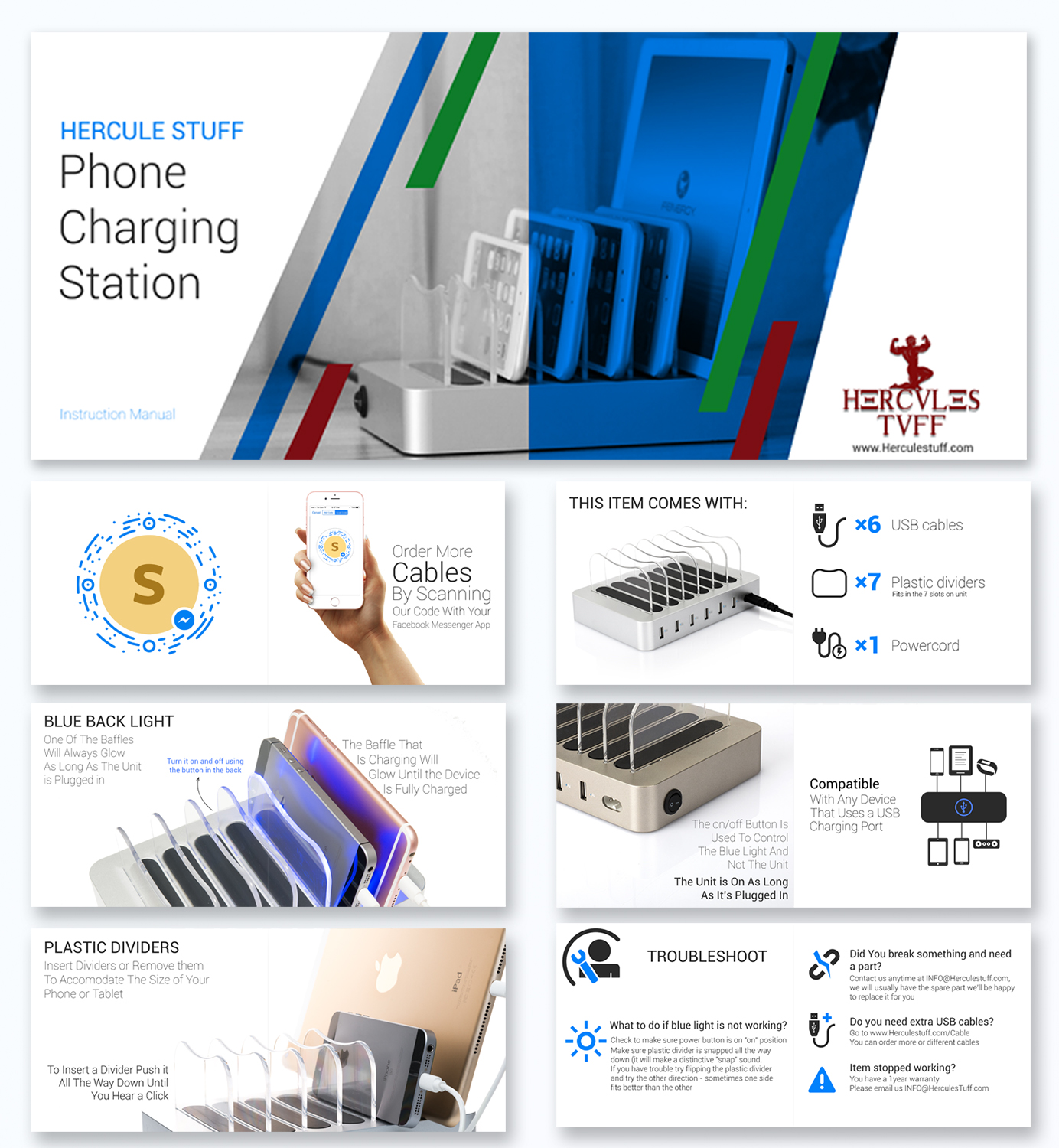
Ce client a reçu 49 designs graphiques de la part de 6 designers. Il a choisi ce design graphique de MJDesign comme design gagnant.
Inscrivez-vous Trouvez des Projets de Design
- Garanti
-
 US$290
-
 49 designs
-
 6 designers
Brief de Design Graphique
Hi, we currently sell a charging station that comes with a teeny tiny generic instruction manual - we are looking to create a large horizontal 7inch x 6inch - less words, more pictures. Imagine you bought an IPAD or any Apple Product- that's kind of the look we're shooting for - mostly colorful images, less words. Please create a graphic rendering of product if you need to. Here are the things that should be in this instruction manual (not in this wording, use your own words)
1. scan image using messenger APP to order additional cables (see project brief - it's the strange looking letter S)
2. the button on the unit is NOT a power button, but it turns the blue light on or off. the unit is on as long as it is plugged in.
3. the plastic dividers should be pushed into the space allotted - use some muscle - push it down until you hear a "snap" - once inserted it can can be removed, put some muscle into it. plastic dividers can be removed to accomodate thicker bulkier phone and tablet cases.
4. one of the baffle will always glow blue when plugged in if the "on" button is on
5. when "blue light is on" the baffle that is charging a device will start to glow
6. unit will stop charging - and blue light will turn off, when a device is fully charged
Troubleshoot:
1. what to do if blue light not working - answer - check to make sure power button is on "on" position. Make sure plastic divider is snapped all the way down (it will make a distinctive "snap" sound. If you have trouble try flipping the plastic divider and try the other direction - sometimes one side fits better than the other
2. you break something and need a part - answer: contact us anytime at INFO@Herculestuff.com, if we have the spare part (and we usually do) we'll be happy to replace it for you.
3. you need extra USB cables - go to www.Herculestuff.com/Cable to order more or different cables
4. item stopped working - you have a 1year warranty - please email us INFO@HerculesTuff.com
5. on the "BACK" side of this instruction maual please include some contact us information on there:
email us anytime, we're real people who reads and writes emails!
info@HerculesTuff.com
Janine@HerculesTuff.com
Brian@HerculesTuff.com
Connect with us on Facebook at Facebook.com/HerculesTuff
we image this leaflet/instruction manual will be 6-12 pages - mostly images, the less text the better.
Designers can submit just ONE-page to get feedback on what we think of overall theme/design/colors. We are very active on this platform and will always provide feedback very quickly. We look forward to all your submissions.

Mises à jour
Project Deadline Extended Reason: give more time for designers who are interested in project. Added Monday, October 23, 2017
Styles de police à utiliser

Couleurs
Couleurs choisies par le client et à utiliser dans le design de logo:
Aspect
Chaque curseur illustre les caractéristiques de la marque client et le style que doit transmettre votre design de logo.
Élégant
Audacieux
Léger
Sérieux
Traditionnel
Moderne
Sympathique
Professionnelle
Féminin
Masculin
Coloré
Conservateur
Économique
Haut de gamme
Exigences
Doit avoir
- graphics, images, nice background, product image rendering if needed to illustrate certain things. All images included designers are free to use as they wish, but should have some graphic rendering of their own to illustrate any necessary points as discussed above
Bien d'avoir
- a step by step guide on how to use the item. item comes with powercord, 6x USB cables, 7 plastic dividers that fits in the 7 slots on unit. graphic renderings to illustrate how-to would be super.
Ne doit pas comporter
- spelling errors or grammar errors of any sort


